
How to Use AI to Generate a Meal Plan From a Text Description
Foodzilla’s AI meal plan generator lets you describe the meal plan you want in your own words, then converts your instructions into editable meal plan settings.
Instead of manually choosing every option, you can write the request naturally, just as you would explain it to a colleague.
For example:
“Create a 5 day dairy free meal plan around 1800 calories, high protein, with 3 meals and 1 snack, and no mushrooms.”
Foodzilla will interpret your request, fill in any missing settings, and let you review everything before the meal plan is generated.
This feature is available on the Professional Plan and above.
How to Generate a Meal Plan From a Description
- Go to the Meal Plans page and click Auto Generate.
- Select the Describe tab.
- Enter the meal plan you want in plain language.
- Click Review settings.
- Review how Foodzilla interpreted your request.
- Adjust any settings if needed.
- Generate the meal plan.
Foodzilla does not immediately generate the plan from your description. You first get a chance to review the settings, helping you stay in control of the final result.
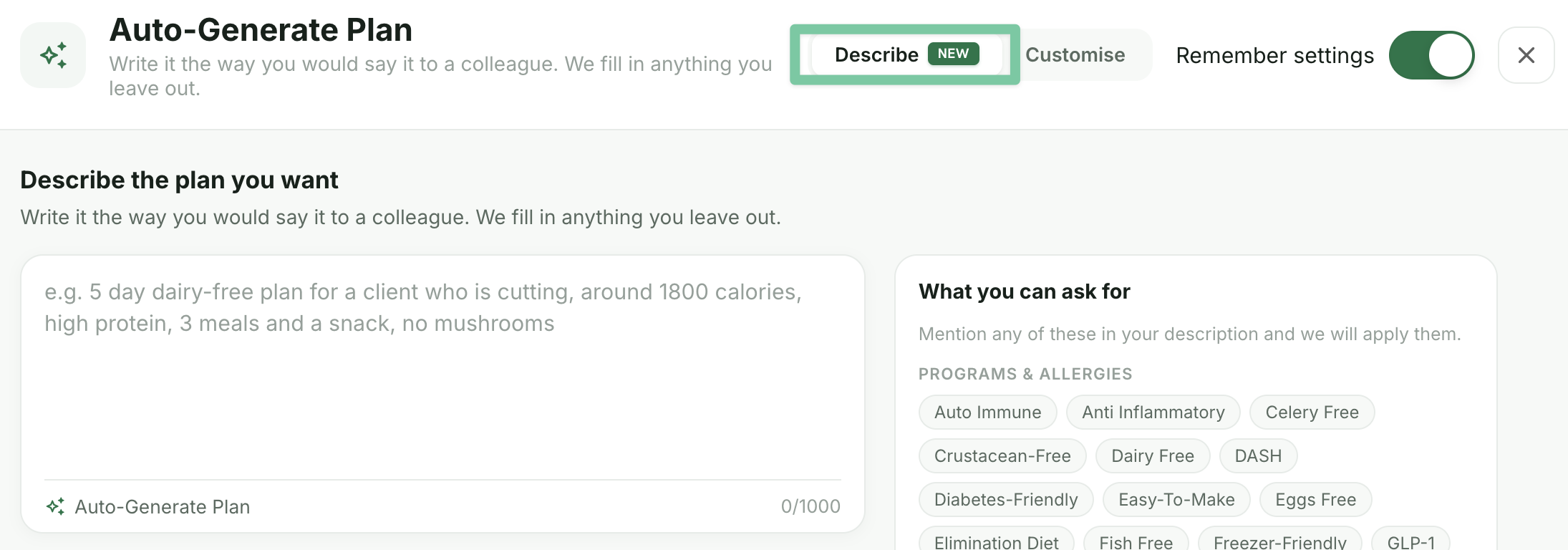
What Can the AI Meal Plan Generator Understand?
You can include details such as:
• Number of days
• Meals and snacks per day
• Daily calorie target
• Macro targets in percentages or grams
• Dietary requirements
• Allergies
• Health and programme preferences
• Foods to avoid
• Favourite foods
• Recipe repetition preferences
• Nutrient priorities
You can be as simple or as detailed as you like.
Dietary and Health Preferences
Foodzilla can recognise supported preferences such as:
Dairy Free, Gluten Free, Vegan, Vegetarian, Mediterranean, Low FODMAP, PCOS, Anti Inflammatory, Diabetes Friendly, Halal, Keto Friendly, Low Histamine, Whole Foods, and more.
You can include these directly in your description instead of selecting each setting manually.
For example:
“7 day Mediterranean meal plan, 2000 calories, high protein, low sodium, no pork.”
Generate Nutrient Focused Meal Plans
You can also describe nutrient priorities such as:
High Fiber, Low Sodium, High Magnesium, High Potassium, High Iron, and other supported nutrient targets.
This can be useful when creating meal plans around specific nutritional requirements.
Review AI Meal Plan Settings Before Generating
After entering your description, Foodzilla converts your request into structured meal plan settings.
Before anything is generated, you can review:
• What Foodzilla understood from your prompt
• Any settings automatically filled in
• Dietary and allergy selections
• Calorie and macro targets
• Meal structure and duration
• Other generation preferences
You can then edit anything before continuing.
AI Meal Plan Prompt Examples
If you are not sure what to write, try prompts such as:
“7 day meal plan, 2000 calories, 3 meals and 2 snacks.”
“Vegan meal plan for one week, high protein, no soy.”
“Cutting meal plan for a 90 kg man who lifts 4 times a week.”
“5 day dairy free meal plan around 1800 calories, high protein, 3 meals and a snack, no mushrooms.”
Why Use AI to Describe a Meal Plan?
The Describe option can make meal plan creation faster when you already know what you want but do not want to configure every setting manually.
You can describe the plan naturally, review how Foodzilla interpreted your request, make adjustments, and then generate the meal plan.