
How to Get the Cliniko Discount on Foodzilla
Cliniko customers can receive a 10% discount on their Foodzilla subscription.
To qualify, you need to connect your Cliniko account to Foodzilla. Once the integration is connected successfully, the discount will be applied automatically.
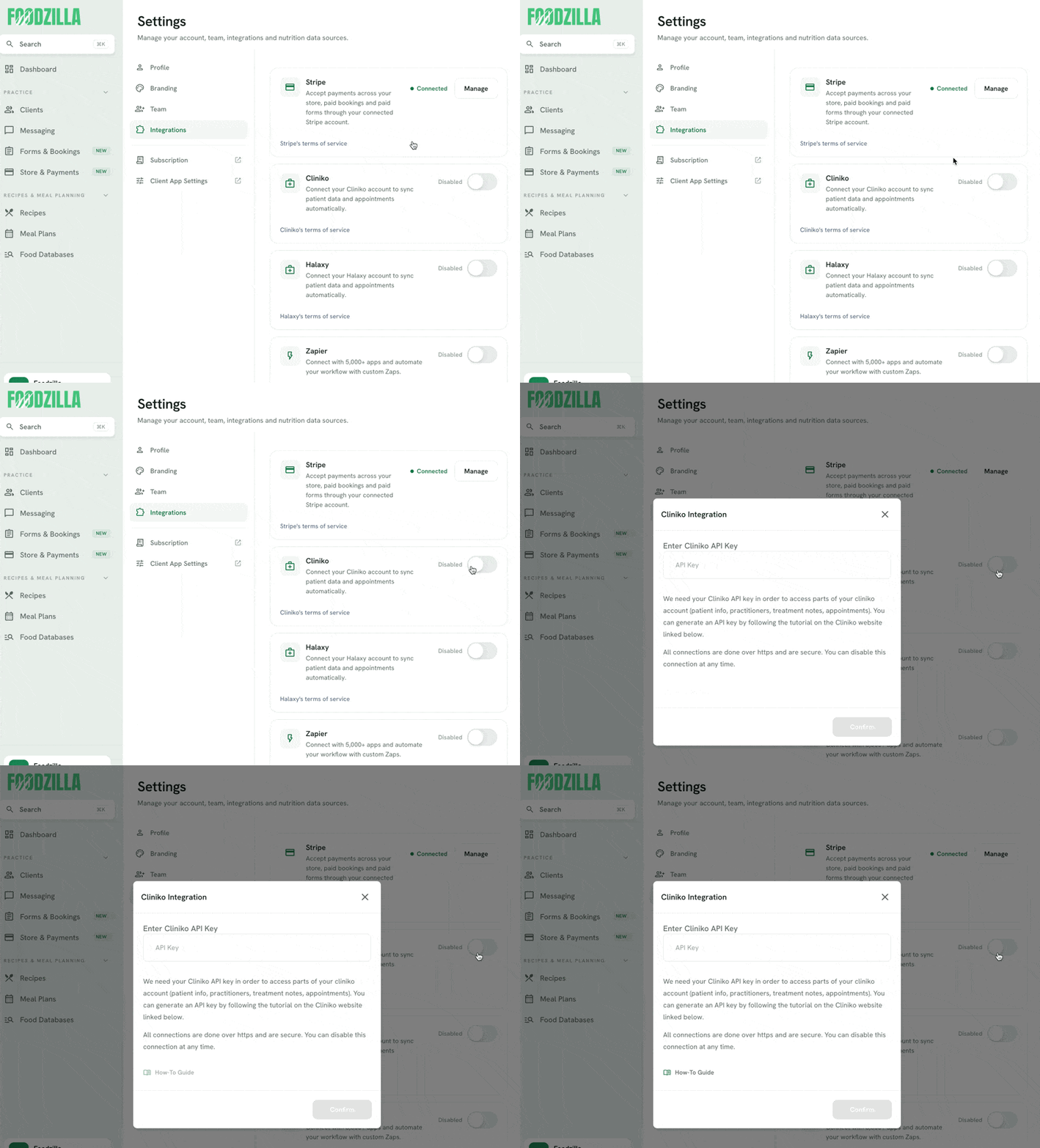
How to Connect Cliniko with Foodzilla
- Generate a Cliniko API Key:
- Follow our step-by-step tutorial on generating a Cliniko API key.
- Go to Settings > Integrations > Cliniko, then enter your Cliniko API key and confirm the connection.
- The setup only takes a few minutes. If you need help connecting your accounts, contact our support team through the green chat bubble.
- Confirm the Discount:
- After connecting your Cliniko account, a confirmation message will appear on Foodzilla's integrations page.
- You can then go to your Subscription page > Billing & Payment to confirm that the 10% Cliniko discount has been applied.
FAQs
- What happens if I stop being a Cliniko customer?
- The 10% discount is available while you remain an active Cliniko customer. If your Cliniko account is cancelled or the integration is no longer eligible, the discount will be removed from your Foodzilla subscription.
- Can I combine discounts?
- No. Only one discount can be active on a Foodzilla subscription at a time.
- Are there other discounts I can claim?
- You can only apply one discount per subscription. If you're already using a discount, you can't claim another.
- If you're a member of a nutrition-related organization partnered with Foodzilla, contact our team to apply for a special discount.
- If your organization is not yet a partner, ask them to contact us to become a partner and potentially offer discounts to their members.
For any additional questions or assistance, please reach out to our support team through the chat bubble.